
 Packages
This article explains how to configure and use packages in the Zadig system. When running builds, tests, code scans, and general tasks in Zadig, users typically need to install necessary software package environments based on their specific business requirements. For example, compiling backend-related code requires Go environment, Java environment, etc., while front-end code requires NodeJS environment and other environments.
# Create a New Software Package
Click System Settings -> Packages -> Click Add.
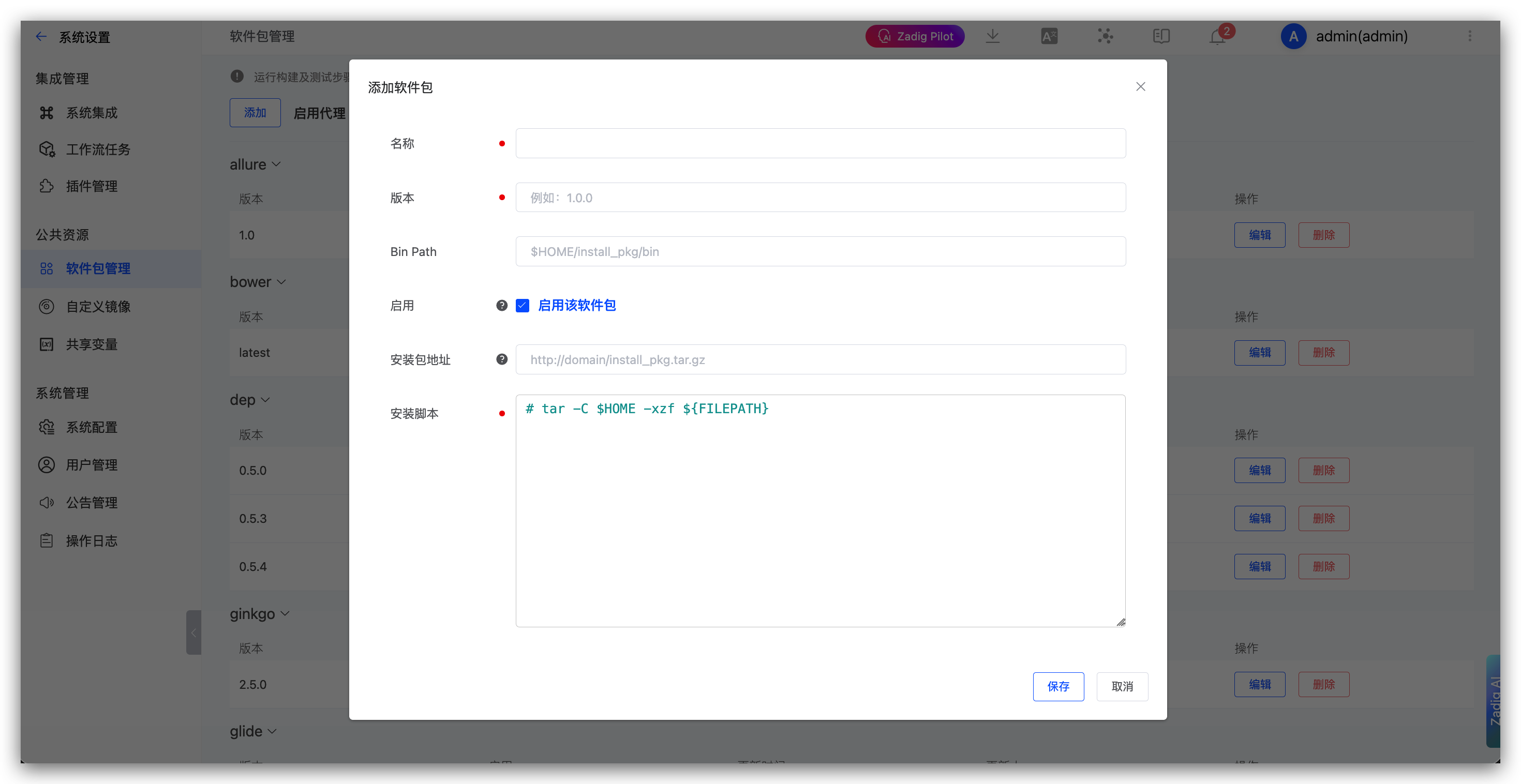
Parameter Description:
Name: The package nameVersion: The package versionBin Path: The software package binary installation path. Default is$HOME/packageEnabled: Controls whether the package is displayed in the package list. Packages currently in use are not affected. Enabled packages can be displayed inProject->Build->AddBuild ->Dependent Software PackagesPackage Address: The system automatically downloads the installation package from the configured address and caches it. The installation package can be obtained through the${FILEPATH}variableInstallation Script: The software package installationshellscript
# Using Software Packages
Supports configuring dependent software packages for builds, tests, code scans, and general tasks. Reference the following documentation:
# Built-in Software Packages
To facilitate quick configuration, the system includes the following commonly used software packages. Visit System Settings -> Package Management to view specific configurations.
bowerdepginkgoglidegojMeterjavamavennodephantomjsphppythonyarn

